Historical Trends
Quick Reference Guide
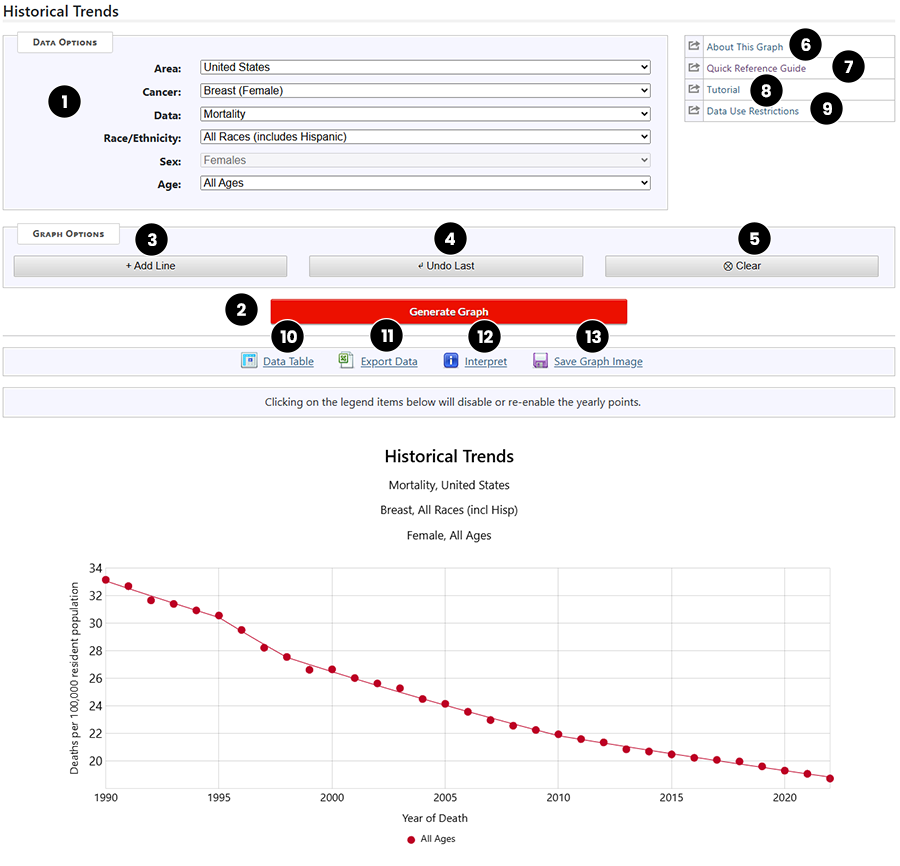
This graphic shows the Historical Trends Graph for female breast cancer mortality in the United States.
- Selection Box - this box allows you to select the data you would like to see in the table from the dropdown lists.
- Generate Graph (button) - creates the graph based on the data selected above.
- Add Line (button) - allows you to put additional lines in the graph, after changing the Selection Box options.
- Undo Last (button) - removes the last line added to the graph.
- Clear (button) - clears the entire graph of all lines.
- About this Graph (link) - displays a text description of this graph.
- Quick Reference Guide (link) - displays this printable guide.
- Tutorial (link) - displays a list of tutorials and demos available for this graph.
- Data Use Restrictions (link) - links to the explanation of the restrictions for using this graph.
- Data Table (link) - displays the data from the graph in a table format.
- Export Data (link) - creates a text file of the data, which can be used in Excel or other software packages.
- Interpret (link) - displays a text description of this graph.
- Save Graph Image (link) - opens or saves the graph in a .png file.