Home Page
Quick Reference Guide
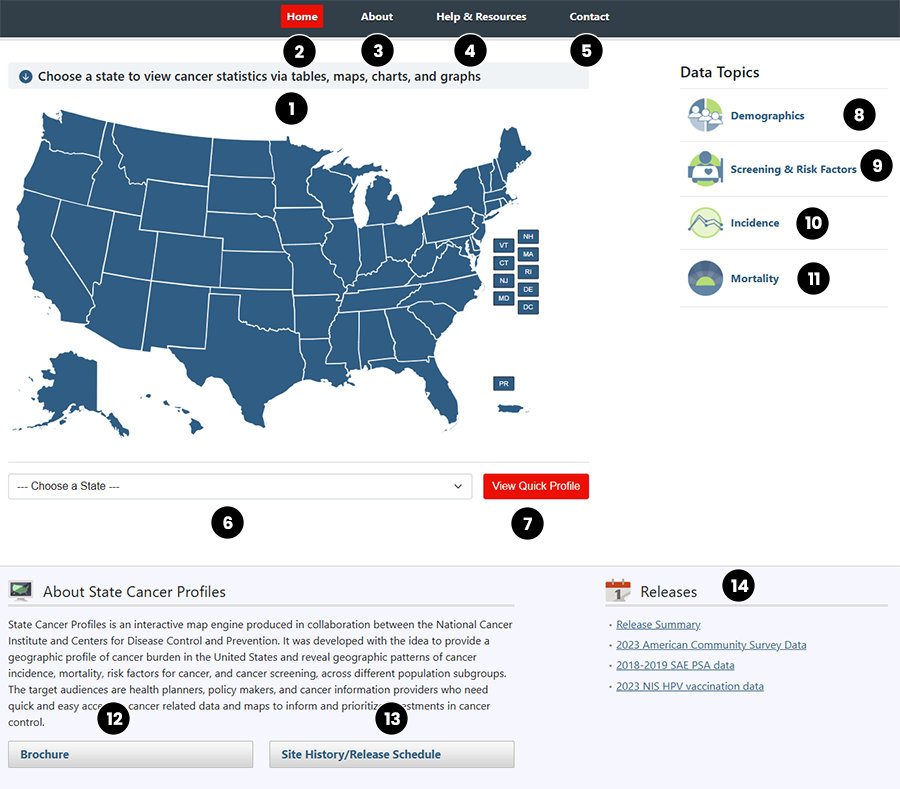
This graphic shows the home page of the State Cancer Profiles website.
- Quickly generate a set of standard graphs, tables, and maps for a state and cancer site by clicking on the map, then modify them to show the information you need.
- Home Page - The link to the Home Page is red to indicate your current location.
- About - Link to About for information on this web site and the history of releases.
- Help & Resources - Link to Help & Resources to find tutorials, detailed descriptions of available tables and graphs, the Quick Reference Guides, the Dictionary of Terms, FAQs and Data Use Restrictions.
- Contact - Link to Contact to submit questions or comments to the Cancer State Profiles team.
- Choose a State - Select a state from the Choose a State dropdown list or by clicking the state of choice on the map.
- View Quick Profile - The View Quick Profile button generates the cancer data when you select the state from the dropdown list.
- Demographics - Generate maps, tables, and graphs of census data at a state and county level.
- Screening and Risk Factors - Generate maps, tables, and graphs for screening and risk factors at a state and county level.
- Incidence - Generate maps, tables and graphs showing incidence rates by cancer site, sex, race and other demographic variables, as well as historic trends in cancer incidence.
- Mortality - Generate maps, tables and graphs showing mortality rates by cancer site, sex, race and other demographic variables, as well as historic trends in cancer mortality.
- Brochure - Printable brochure of the topics and functionality of the site.
- Site History/Release Schedule - Link to the site history of releases and revisions.
- Releases - Links to most recent State Cancer Profiles releases.