Quick Profiles Report
Quick Reference Guide
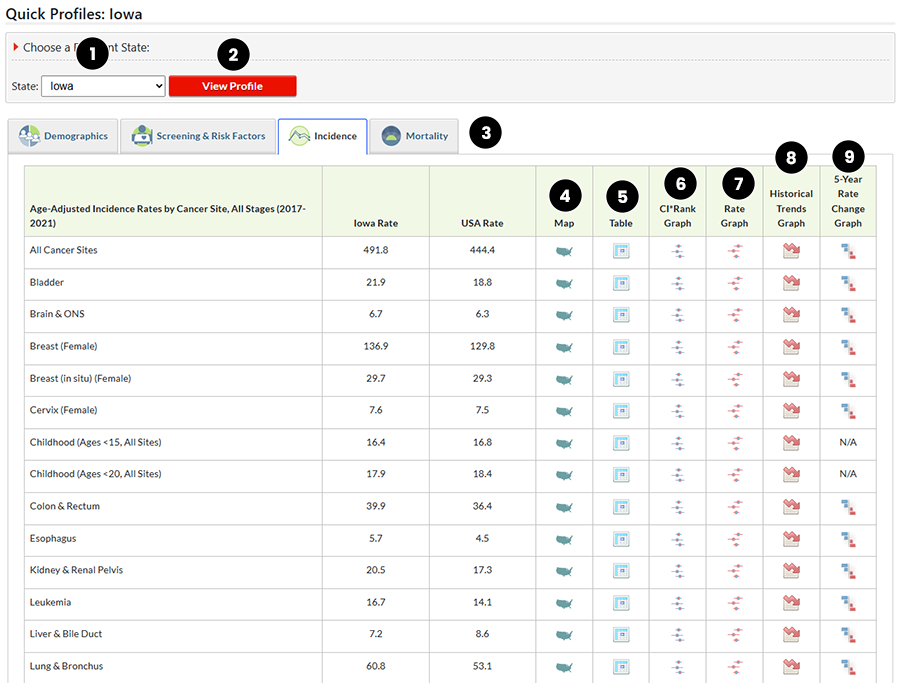
This graphic shows the Quick Profiles Report for Iowa compared with the United States and All Cancer Sites.
- Selection Box - Make a selection from the State dropdown list for the Quick Profile you want to view.
- View Profile (button) - click on this button to view reports for the state you selected.
- Statistics Tabs (tab) - Select the tab for the statistics you want to view. The default tab is Incidence.
- Map (icon) - Click on the Map icon to see and interactive map of the data.
- Table (icon) - Click on the Table icon to see an interactive table of the data.
- CI*Rank Graph (icon) - Click on the CI*Rank Graph icon to open an interactive graph of the data.
- Rate Graph (icon) - Click on the Rate Graph icon to open an interactive graph of the data.
- Historical Trends Graph (icon) - Click on the Historical Trends Graph icon to see an interactive graph of the data.
- 5-Year Rate Change Graph (icon) - Click on the 5-Year Rate Change Graph icon to see an interactive graph of the data.